Page 1 of 1

[SOLVED] How do I obtain "common mods" or world(s) to start with?

PostPosted: Mon Apr 08, 2013 23:55
by jeeves
I just compiled Minetest 0.4.6 on Linux, but I am a total newbie (never played MineCraft or any similar game). I am having problems getting the Minetest game started as a single player.

The Mintest program lanuches, but there are no worlds to choose from under the "Select World" box (see below).
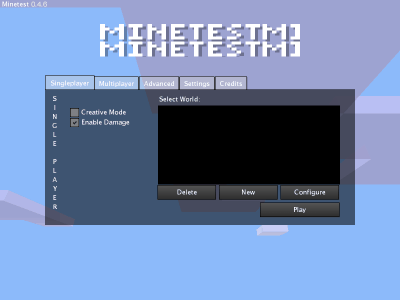
Image

I tried selcting "New" and creating world, but then I get the following message when I try to start playing in that world

"ModError: Requires common mods: default, bucket, creative, door, dye, file, stairs, vessles, wool"

Can anyone help. I am a total beginner at gaming, and I was not able to locate anything in the wiki to help me get unstuck.

PostPosted: Tue Apr 09, 2013 03:56
by DaN
jeeves wrote:I just compiled Minetest 0.4.6 on Linux, but I am a total newbie (never played MineCraft or any similar game). I am having problems getting the Minetest game started as a single player.

The Mintest program lanuches, but there are no worlds to choose from under the "Select World" box (see below).

Image

I tried selcting "New" and creating world, but then I get the following message when I try to start playing in that world

"ModError: Requires common mods: default, bucket, creative, door, dye, file, stairs, vessles, wool"

Can anyone help. I am a total beginner at gaming, and I was not able to locate anything in the wiki to help me get unstuck.


jeeves, I got this error too. I presume the ModError means that Minetest can't find the "common" mods (new addition to 0.4.5/6) in the Minetest folder.
I'd go check where all the gamemodes are stored. I think it is in ~/.minetest or /usr/share/minetest or something similar.

PostPosted: Tue Apr 09, 2013 05:00
by cheapie
You need to install "common" and optionally "minetest_game", "build", and "creative".

PostPosted: Tue Apr 09, 2013 05:38
by jeeves
cheapie wrote:You need to install "common" and optionally "minetest_game", "build", and "creative".


OK, a bit of googleing and I found the Github page for "Minetest Common Mods" [ https://github.com/minetest/common ]. Judging from the contents of the zip file I downloaded it contains the mods I need. The problem is the instructions on Github make no sense. It says to install the files to $path_share/games/common which given my $path variable works out /usr/local/bin_share/games/common. Needless to say, minetest is not finding the mods in this location.

Where are these really supposed to go on a Linux system?

PostPosted: Tue Apr 09, 2013 06:37
by Menche
jeeves wrote:
cheapie wrote:You need to install "common" and optionally "minetest_game", "build", and "creative".


OK, a bit of googleing and I found the Github page for "Minetest Common Mods" [ https://github.com/minetest/common ]. Judging from the contents of the zip file I downloaded it contains the mods I need. The problem is the instructions on Github make no sense. It says to install the files to $path_share/games/common which given my $path variable works out /usr/local/bin_share/games/common. Needless to say, minetest is not finding the mods in this location.

Where are these really supposed to go on a Linux system?

~/.minetest/games/ (for just your user) or /usr/share/minetest/games/ (systemwide)

PostPosted: Tue Apr 09, 2013 10:58
by xavier108
jeeves wrote:I just compiled Minetest 0.4.6 on Linux, but I am a total newbie (never played MineCraft or any similar game). I am having problems getting the Minetest game started as a single player.

The Mintest program lanuches, but there are no worlds to choose from under the "Select World" box (see below).

Image

I tried selcting "New" and creating world, but then I get the following message when I try to start playing in that world

"ModError: Requires common mods: default, bucket, creative, door, dye, file, stairs, vessles, wool"

Can anyone help. I am a total beginner at gaming, and I was not able to locate anything in the wiki to help me get unstuck.

The common mods like default,creative.......It already should be installed on your game.Try downloading it again.

PostPosted: Tue Apr 09, 2013 12:31
by PilzAdam
If you have a run_in_place version then path_share is just the folder; for a globaly installed version its ~/.minetest/ and /usr/share/minetest/

PostPosted: Tue Apr 09, 2013 17:53
by stu
For me the game directory (system wide install) is located at /usr/local/share/minetest/games

I'm using xubuntu precise

PostPosted: Tue Apr 09, 2013 22:21
by jeeves
thanks. I finally found a path that works for me on my Arch Linux install. Its:

/usr/share/minetest/games

When I unzip the file I downloaded from github its folder called "common-master," so I renamed that folder to "common" and moved it into the /usr/share/minetest/games/ directory. This makes the full path to a mod like "default" go as such:

/usr/share/minetest/games/common/mods/default