Page 1 of 1

changing display_gamma has no effect / brightness-setting?

PostPosted: Sat Jan 21, 2017 12:43
by hajo
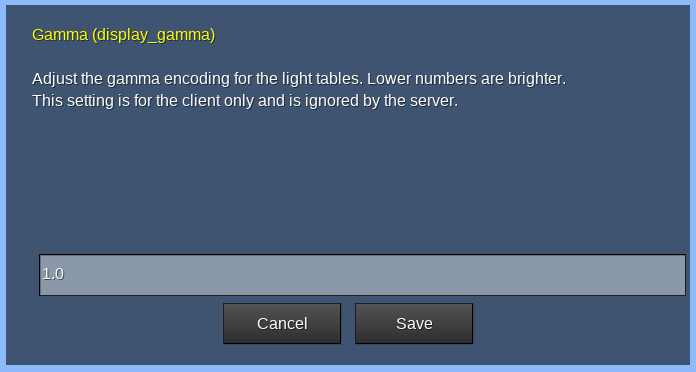
As far as I understand the settings, display_gamma should have values
around 1.1 .. 2.2, with a default of 1.8

I installed minetest 0.4.15-stable on an old windows-pc (with a crt) of a friend,
and the display was too dark (e.g. inventory is almost completely-black on dark-gray),
so I tried to change the brightness, with different settings of display_gamma.

But there is no noticable change of brightness, even for values like -11 / -1.1 / 1.1 / 2.2 / 11.1.
I tried such changes on my own machine, and there too is almost no change to see.

So, how does display_gamma work, and are there other setting that affect brightness ?

Also, (finding and) changing this value (repeatedly) in the main-menu is a pain,
and doing it with a command "/set display_gamma = 1.1" is not much better :-(
Re: changing display_gamma has no effect / brightness-settin

PostPosted: Sat Jan 21, 2017 15:03
by Sergey
Gamma can be changed in range from 1.0 (brightest) to 3.0 (darkest) [http://wiki.minetest.net/Troubleshooting#The_screen_is_too_dark]

I personally made it little brighter -- from 1.8 (default) to 1.5. But it is, nevertheless, too dark underground.

By the way, are there light GUI theme for Minetest? For example, light invertory background, dark letters on light background -- like themes in many text editors/browsers/another GUI program?

Re: changing display_gamma has no effect / brightness-settin

PostPosted: Sat Jan 21, 2017 15:32
by Morn76
Sergey wrote:Gamma can be changed in range from 1.0 (brightest) to 3.0 (darkest) [http://wiki.minetest.net/Troubleshooting#The_screen_is_too_dark]

I personally made it little brighter -- from 1.8 (default) to 1.5. But it is, nevertheless, too dark underground.

Since December 28, gamma now works the other way around, so now 3 is the brightest it can get (previously 1 was the brightest setting I believe): https://github.com/minetest/minetest/commit/094a5a73d3b9817d07c52754749f0828c4005b8c Just something to keep in mind if you update MT to a later version.

Re: changing display_gamma has no effect / brightness-settin

PostPosted: Sat Jan 21, 2017 15:37
by Sergey
Morn76 wrote:
Sergey wrote:Gamma can be changed in range from 1.0 (brightest) to 3.0 (darkest) [http://wiki.minetest.net/Troubleshooting#The_screen_is_too_dark]

I personally made it little brighter -- from 1.8 (default) to 1.5. But it is, nevertheless, too dark underground.

Since December 28, gamma now works the other way around, so now 3 is the brightest it can get (previously 1 was the brightest setting I believe): https://github.com/minetest/minetest/commit/094a5a73d3b9817d07c52754749f0828c4005b8c Just something to keep in mind if you update MT to a later version.

It is interesting why not making human-readable scale from 0 to 100? Like percent. 0 -- darkest, 100 -- brightest. Why remembering values like 1.0 and 3.0, and what is bright and what is dark (or vice versa)?

Re: changing display_gamma has no effect / brightness-settin

PostPosted: Sat Jan 21, 2017 15:49
by Morn76
Sergey wrote:It is interesting why not making human-readable scale from 0 to 100? Like percent. 0 -- darkest, 100 -- brightest. Why remembering values like 1.0 and 3.0, and what is bright and what is dark (or vice versa)?

I think it's more logical than before: You set the gamma of your output device, and MT will apply a 1/gamma correction to the video to compensate. But I agree that a nice brightness slider in the GUI like in MC would be easier to understand for people.

A monitor with gamma=3 would have really dark midtones. So MT applies gamma correction with gamma=1/3=0.3333..., so now the midtones are boosted a lot. So if your actual display runs at gamma 2.2, as most PC monitors do, the picture will look really bright and you can e.g. see the walls in caves without any torches nearby.

Gamma correction is a difficult topic though and is rarely explained well. This article was linked from Hacker News a while ago is really helpful.

Re: changing display_gamma has no effect / brightness-settin

PostPosted: Sat Jan 21, 2017 16:33
by Sergey
The fact is that I reduced brightness and contrast of my LCD monitor because default white color hurts my eyes. So I make my monitor displaying things dimmed. But the game became too dark.

I don't see gamma value in my LCD monitor menu. I have brightness -- 20 (100) and contrast -- 70 (100). In parenthesis there are default (factory) values.

Re: changing display_gamma has no effect / brightness-settin

PostPosted: Sat Jan 21, 2017 17:06
by Sergey
Are there any tests to find out whether gamma is set right?

I mean someting like this.

In complele darkness (dig under ground 3 blocks deep and cover the hole with dirt block) set torch under yourself (on floor) and then dig in any direction. How many blocks away from the torch is distinguishable the block on front of me (dirt, stone, ore in stone,...)?

Re: changing display_gamma has no effect / brightness-settin

PostPosted: Sat Jan 21, 2017 17:18
by Morn76
Sergey wrote:Are there any tests to find out whether gamma is set right?

I mean someting like this.

In complele darkness (dig under ground 3 blocks deep and cover the hole with dirt block) set torch under yourself (on floor) and then dig in any direction. How many block away from the torch can I distinguish the block on front of me (dirt, stone, ore in stone,...)?

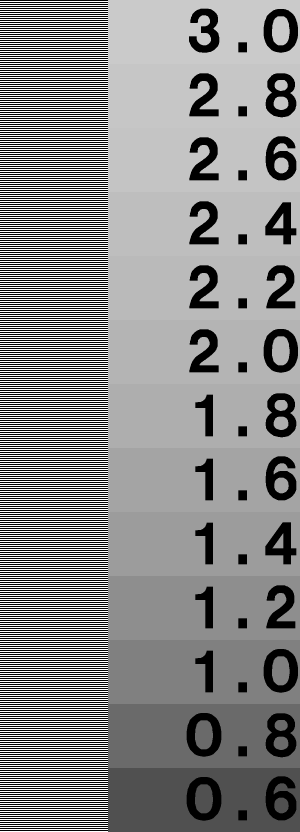
There are test images like this one: http://www.graphics.cornell.edu/~westin/gamma/ward.png At 2.2 on the scale, the striped and solid blocks should be the same brightness. Make sure to view this at 100% magnification in the browser though! Scaling images messes with the black-and-white alternating pixels and introduces grays, which gives the wrong result.

My personal solution is to set monitor brightness/contrast both to 50%, and use my Python tool PyBrite to adjust brightness and gamma via software. E.g. right now it is set to 70%/.7 in PyBrite for viewing my desktop in a dimly lit room. I can also set it above 100%/1 e.g. for YouTube videos that are too dark. (Note that these adjustments only work on X Window though, not Wayland.)

And yes, in addition to that I have display_gamma=3 for Minetest-git, because I like the bright look. :-)

Sergey wrote:I don't see gamma value in my LCD monitor menu. I have brightness -- 20 (100) and contrast -- 70 (100). In parenthesis there are default (factory) values.

"Contrast" is gamma, and "brightness" is black point AFAIK. Monitor hardware adjustments use the wrong names for historical reasons I guess. So adjust your monitor "contrast" until the test image above looks correct at gamma 2.2.

Re: changing display_gamma has no effect / brightness-settin

PostPosted: Tue Jan 24, 2017 18:28
by Sergey
Morn76 wrote:And yes, in addition to that I have display_gamma=3 for Minetest-git, because I like the bright look. :-)

I did the same :-)

Re: changing display_gamma has no effect / brightness-settin

PostPosted: Tue Jan 24, 2017 18:34
by Morn76
Sergey wrote:
Morn76 wrote:And yes, in addition to that I have display_gamma=3 for Minetest-git, because I like the bright look. :-)

I did the same :-)

And, have you tested your monitor's calibration with the test image?

Re: changing display_gamma has no effect / brightness-settin

PostPosted: Tue Jan 24, 2017 19:18
by Sergey
Morn76 wrote:
Sergey wrote:
Morn76 wrote:And yes, in addition to that I have display_gamma=3 for Minetest-git, because I like the bright look. :-)

I did the same :-)

And, have you tested your monitor's calibration with the test image?

What should I do? Compare black-white stripes on left with gray fields on right? And what must be the result of that comparison? How can I estimate approx. equality if brightness visually?

Re: changing display_gamma has no effect / brightness-settin

PostPosted: Tue Jan 24, 2017 21:31
by Morn76
Sergey wrote:What should I do? Compare black-white stripes on left with gray fields on right? And what must be the result of that comparison? How can I estimate approx. equality if brightness visually?

You need to move further away from the screen until the stripes on the left blur together into a gray. The idea is that your eyes average the black and white pixels on the left into a mid-gray, and then you compare that shade of gray to what it should be for your gamma.

So the left striped area should look about as bright to you as the 2.2 or 2.4 rectangles on the right. The larger values should look lighter, the lower values darker.

Re: changing display_gamma has no effect / brightness-settin

PostPosted: Tue Jan 31, 2017 12:45
by Sergey
Morn76 wrote:
Sergey wrote:Gamma can be changed in range from 1.0 (brightest) to 3.0 (darkest) [http://wiki.minetest.net/Troubleshooting#The_screen_is_too_dark]

I personally made it little brighter -- from 1.8 (default) to 1.5. But it is, nevertheless, too dark underground.

Since December 28, gamma now works the other way around, so now 3 is the brightest it can get (previously 1 was the brightest setting I believe): https://github.com/minetest/minetest/commit/094a5a73d3b9817d07c52754749f0828c4005b8c Just something to keep in mind if you update MT to a later version.

Latest stable version 0.4.15.

Value 1.0 is brightest.

Image

Re: changing display_gamma has no effect / brightness-settin

PostPosted: Tue Jan 31, 2017 18:14
by Morn76
Sergey wrote:
Morn76 wrote:
Sergey wrote:Gamma can be changed in range from 1.0 (brightest) to 3.0 (darkest) [http://wiki.minetest.net/Troubleshooting#The_screen_is_too_dark]

I personally made it little brighter -- from 1.8 (default) to 1.5. But it is, nevertheless, too dark underground.

Since December 28, gamma now works the other way around, so now 3 is the brightest it can get (previously 1 was the brightest setting I believe): https://github.com/minetest/minetest/commit/094a5a73d3b9817d07c52754749f0828c4005b8c Just something to keep in mind if you update MT to a later version.

Latest stable version 0.4.15.

Value 1.0 is brightest.

Yes, 0.4.15 was released on December 22, six days before the commit. It will be in 0.4.16 though.